
Get the most out of Claude Opus 5.5
It's smarter than you think. Trust it more, steer it less.
Claude Opus 5.5 is really smart, and it's a great writer. The biggest mistake is to treat it like a weak model.
Older models often needed a lot of hand-holding. We wrote long lists of rules, used ALL CAPS, repeated the same warning three times and corrected them all the time. Many of us still prompt that way out of habit.
With Opus 5.5, those habits mostly get in the way. It always thinks before it replies, decides on its own how much to think, and can carry a long task through to the end. Anthropic even suggests deleting lines like "think carefully" from your prompts, because they only slow it down.
- Instead of rules in ALL CAPS
- give it a clear goal and the context it needs.
- Instead of "think step by step"
- pick the right effort level.
- Instead of tiny tasks
- hand over the whole task, with a clear finish line.
- Instead of restarting
- send the missing detail while it works.
Here's what still makes a real difference. It's based on Anthropic's prompting guide for Opus 5.5, their blog post on the model, and what I found using it every day.
1. Start at medium effort
Effort is the main dial for how much Opus 5.5 thinks. Use medium, and only go higher when you see clearly better results. Stay away from low and max.
medium is the default in Claude Code, and you can switch with /effort. The names don't mean the same thing across models: Opus 5.5 at medium matches or beats Opus 5 at high. So don't just carry over the
setting you used before.
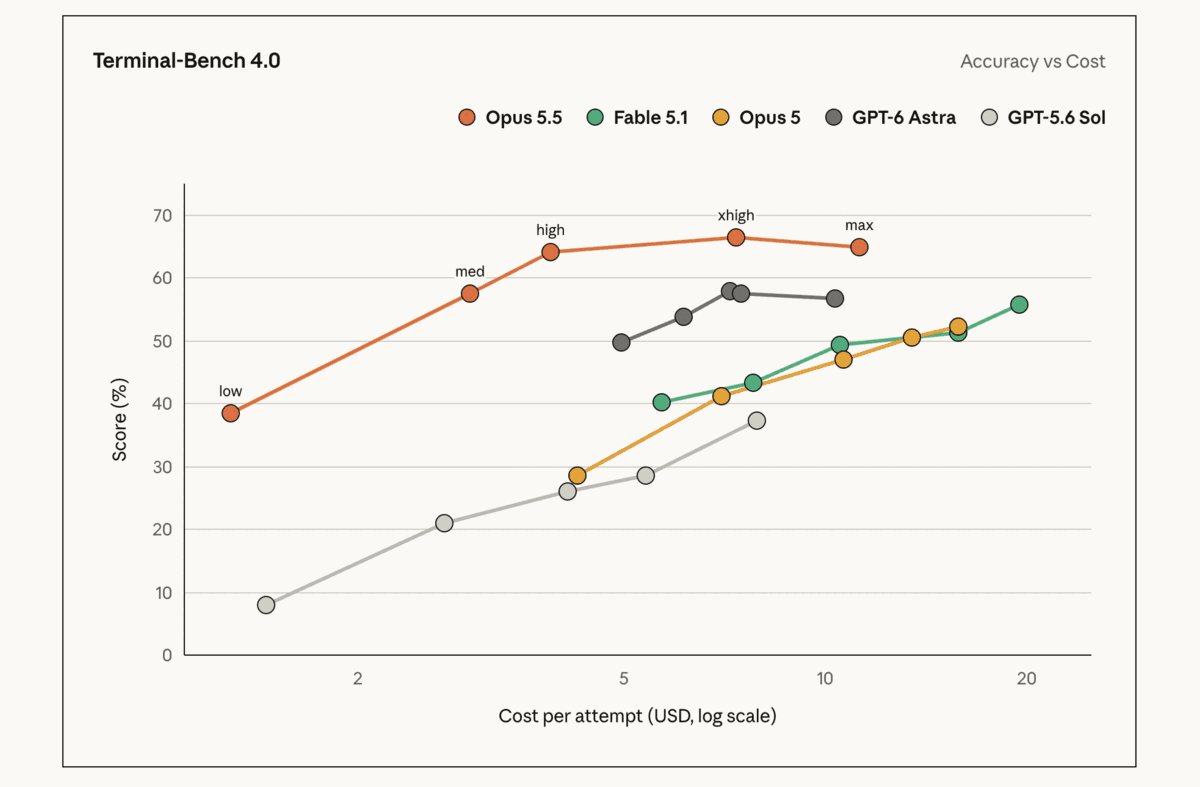
Read the Opus 5.5 line in Anthropic's chart from left to right:
- low (about 38%) saves money but loses a lot of quality. Not worth it for real work.
- medium (about 57%) is the sweet spot. It matches the best result of any other model in the chart, at less than half the cost.
- high (about 64%) is a solid step up for a little more money. Try it for hard tasks.
- xhigh (about 66%) roughly doubles the cost for a small gain.
- max costs the most and scores lower than xhigh. More thinking isn't automatically better.
My rule: run everything on medium. If one kind of task keeps going wrong, try high for it and compare. Keep the higher level only if the results are clearly better,
not just longer.
2. Give it complex work, but plan it first
Opus 5.5 handles big, multi-step work: migrations, audits, whole features. When a big run fails, the cause is rarely the model. It's a vague request.
"Add authentication" leaves dozens of decisions open, and Claude has to guess each one. So before the real work starts, talk the task through. Describe the goal and why you need it. Let Claude look at the code and suggest an approach. Push back, answer its questions and settle the open decisions.
- Describe The goal, why you need it, what you already know. You
- Discuss Claude reads the code, suggests an approach and asks questions. Together
- Agree The plan and the finish line, saved to a file for big tasks. Together
- Build Claude works through the plan, with subagents for big jobs. Claude
- Check Tests, lint, a real try. Fix what fails, then check again. Claude
- Review You look at the result and decide what's next. You
You don't need a special plan mode for this. A normal back-and-forth works fine. For bigger tasks, let Claude write the agreed plan to a file, so it survives long runs and you can come back to it.
3. Say when the task is done
If Opus 5.5 stops too early, give it a clear finish line. It rarely happened to me, but when it does, this is the fix.
On long tasks it reports progress as it goes. Now and then, one of those updates ends its turn while work is still open. A concrete finish line makes that much less likely:
Move every endpoint in
src/apito the new client. You're done when no file imports the old client and all tests pass.
If it still stops, just name what's left: "Two endpoints and their tests are still open. Continue with them." For big tasks, a task list in a file helps too, because Claude can tick items off and see what remains.
4. Make it check its own work
Ask Claude to run the tests, the linter and the type checks, and to try the result, before it says it's done. Opus 5.5 is good at finding and fixing its own mistakes, but only if it looks.
Don't repeat this in every prompt. Put it in CLAUDE.md once, and it applies to every
task:
## Before you report a task as done
- Run `npm run lint`, `npm run typecheck` and `npm test`. Fix every error and warning.
- Try the change yourself: run the script, open the page, call the endpoint.
- Read your own diff for leftovers, dead code and missed cases.
- Then report back: what you changed, how you checked it, and what's still open.
You get fewer "done!" messages that turn out to be broken, and you spend your review time on real decisions instead of typos.
5. Be specific about design
For frontend work, say what you want and what you don't want, down to named patterns and colors.
Without direction, Opus 5.5 falls back on a few default styles. "Make it look modern" or "avoid the generic AI look" doesn't help much: according to Anthropic, it mostly swaps one default for another. Name the patterns instead:
Build a landing page. White background, dark navy text, one orange accent color. Don't use a cream background, gradients, italic accent words in headlines, numbered "01 / 02 / 03" section labels or pill-shaped buttons.
Work in rounds. Look at the first result, spot the default patterns it used, add them to your "don't" list and try again. If you have a design system, a screenshot or a site you like, give it that too. Opus 5.5 reads images very accurately.
6. Use subagents for big tasks
For large jobs, ask Claude to split the work across subagents and check each result. Opus 5.5 is very good at leading a small team of agents.
Each subagent starts with a fresh context and works on one part. The main agent collects the results and checks them. That keeps the main conversation focused, and independent parts run in parallel.
One sentence in your prompt is often enough. Even better, put the pattern in an agent skill, so you don't have to explain it each time. I use an implement-plan skill: it takes a saved plan, hands its tasks to subagents and checks
each result before it moves on. One short command then starts a long, well-organized run.
7. Add details while it works
Forgot something? Changed your mind? Just type it in while Claude works. There's no need to wait for the run to end, or to start over.
Claude Code picks up your message and folds it into the running task. A restart throws away everything Claude has already read and learned about the task, and the longer the run, the more that costs. Messages like these work well:
- "Also update the README when you're done."
- "Skip the admin pages, they're being rewritten anyway."
- "Use the existing
formatDatehelper instead of writing a new one."
Give Opus 5.5 the full picture, a clear finish line and a way to check its work, then let it run. For the basics of the tool around it, see my Claude Code guide.